
Mariella R.
Law Firm Automation Specialist
Six years in agency and practice admin. Turns document chasing, onboarding and recurring reporting into workflows that run themselves.
- Claude
- n8n
- DocuSign
- Google Sheets
 Delegated AI
For small and mid-size firms. First automation live in week one.
Mariella R.
Law Firm Automation Specialist
Six years in agency and practice admin. Turns document chasing, onboarding and recurring reporting into workflows that run themselves.

Maria GomezContent Writer, Delegated AIWrites Delegated AI's guides on automation and delegation.
A law firm automation specialist builds the workflows that route new-client inquiries into Clio or MyCase, run conflict checks against existing matters, dispatch DocuSign engagement letters, assemble standard documents from templates, and send time-entry reminders so billable hours don't leak. They connect Zapier, Make, and Claude to the tools your attorneys already use, without touching privileged client communications.
Last updated
Your Clio Grow queue has a dozen unqualified leads nobody has followed up with since last Tuesday. Every new-matter opening means a paralegal manually searching the client list for conflict names, then emailing a retainer agreement and waiting by the phone. At month-end, your attorneys reconstruct time entries from memory, and a stack of invoices sits unsent because someone has to review and release each one. The docket has four deadlines nobody has calendared yet.
Every hour a paralegal spends on intake, conflict checks, and billing admin is an hour the firm is paying for work that doesn't bill back to any client.
Prospect inquiries reach Clio with a conflict check complete before the attorney picks up the phone.
Retainer agreements go out and get signed without a paralegal chasing each one.
Invoices generated, reviewed, sent, and followed up on without a manual stack at month-end.
One specialist, one flat price, and every workflow they build belongs to you.
A dedicated specialist keeping your intake pipeline clear, your documents assembled, your invoices sent, and your deadlines calendared, across all five working days.
No setup fee. No contract. Stop whenever you want.
Never scoped, never billed per project. The backlog just keeps moving.
Everything is built in your own tools. Cancel and it all keeps running.
A short Friday note on what was automated this week and the hours it saves you.
Academy-trained, background-checked, least-access credentials.
| Delegated AI specialist | Freelance consultant | Automation agency | Doing it in-house | |
|---|---|---|---|---|
| What you pay | One flat monthly rate for 20 hours a week | $100 to $200 an hour | A project fee, then a retainer | A full-time paralegal or legal admin hire |
| Knows Clio and MyCase | Placed from legal operations backgrounds | Depends entirely who you get | Sometimes, on the senior accounts | You hire and train them yourself |
| First workflow live | Week one | After scoping and a signed statement of work | After discovery and onboarding | After hiring, onboarding, and training |
| Works in your practice management system | Clio, MyCase, PracticePanther, or whatever you run | If they have used it before | Often only their supported platforms | Yes |
| Billing and invoice follow-up automated | Invoices generated, sent, and chased without manual release | Usually billed separately per project | Often part of a broader retainer | Whoever has time at month-end |
| If you stop | Every workflow keeps running in your accounts | You inherit whatever is documented | Access can end with the contract | Nothing changes |
The consultant and agency columns describe how those engagements are usually structured, not any one firm. Your own quote is confirmed on the intro call.
Your specialist comes AI-trained and fully fluent in:
Monday 8:47 AM
Wednesday 2:15 PM
Friday 9:05 AM
Our intake process used to be three phone calls and a manual conflict search before we could even open a matter. By the end of the first week the form submissions were landing in Clio with the conflict check already done. We haven't missed a new-client follow-up since.
 David R.Managing Partner, personal injury firmVerified client
Month-end billing was a two-day job. Someone had to chase attorneys for time entries, review every invoice, and manually send each one. Now the invoices go out on the first of the month and the payment reminders follow up automatically. The partner review still happens, but the stack is already done.
 Carol M.Office Manager, estate planning practiceVerified client
Month-to-month, cancel whenever you want. If your specialist is not the right fit, we replace them free. And every workflow lives in your own accounts, so it stays yours either way.
5
Every specialist is matched by hand to your stack, your tools and your timezone, which caps how many businesses we can start properly. When this month is full, the next start date is the following month.
One flat fee.
Your dedicated AI Automation Specialist for Law Firms, 20 hours a week.
Month-to-month. No setup fee. Cancel anytime and keep every workflow.
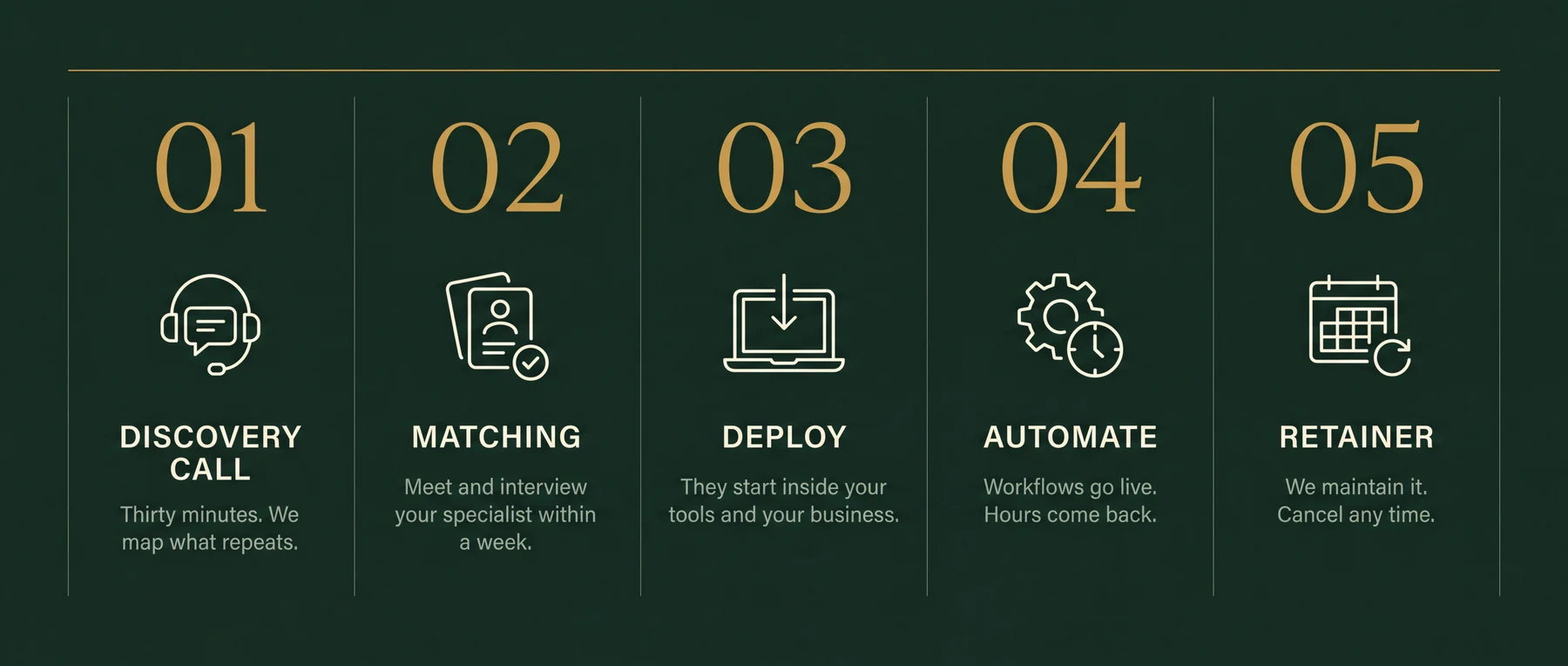
Thirty minutes. Bring your messiest week. You leave with the three workflows worth automating first, sequenced and yours to keep. If we're a fit, your specialist starts within a week.
Client intake routing into Clio or MyCase, conflict-of-interest checks against existing matters, DocuSign engagement letter dispatch and follow-up, standard document assembly from templates, deadline docketing into Outlook or Google Calendar, time-entry reminders for attorneys, month-end invoice generation and payment follow-up with LawPay. The intro call identifies which of those is costing the most time.
No. The automations route and log data between your systems: intake forms, practice management, billing, and calendar. They do not read, summarise, or draft privileged correspondence. Any content-touching work is scoped separately and handled with an NDA in place.
Yes. Clio is the most common platform specialists work in. Automations connect to Clio Manage and Clio Grow via the Clio API and through Zapier or Make. Your existing matters, contacts, and billing data stay exactly where they are.
Yes, for the administrative step: when a new matter or lead is opened, the opposing party names are checked against your existing client and matter list and the result is logged. The attorney still reviews the result and makes the legal judgment. The automation removes the manual search, not the professional decision.
Yes. When a matter is opened in Clio or MyCase, the specialist sets up a workflow that generates a DocuSign envelope from your retainer template, populates it with the client name and fee structure, sends it, and queues a reminder if it isn't signed within 48 hours.
Yes. A monthly trigger compiles unbilled time entries from your practice management system, generates draft invoices, sends them to clients with a LawPay or credit card payment link, and follows up automatically with unpaid accounts. The billing partner still reviews before release if that's your process.
The specialist can automate the docketing step: when a filing date or service date is entered, a rules-based workflow calculates downstream deadlines and creates calendar entries in Outlook or Google Calendar with reminders for the responsible attorney. For jurisdiction-specific court rules, the workflow connects to LawToolBox or your existing calendaring rules.
The first workflow is typically running in week one. The intro call identifies the highest-cost problem, usually intake routing, conflict checks, or billing. That one ships first while the next is being scoped.
The specialist works within your existing practice management system and does not store client data in third-party services without your review. All access is covered by an NDA. Questions about specific bar association technology rules in your jurisdiction are a matter for your ethics counsel; the specialist handles the technical implementation, not the legal compliance opinion.
Thirty minutes on your messiest week. The three workflows worth automating first are yours to keep either way.