
Rafael M.
Accounting Firms Automation Specialist
Seven years in back-office finance ops. Builds Claude agents that assemble Monday's reporting and chase every unpaid invoice on their own.
- Claude
- Make
- Airtable
- Zapier
 Delegated AI
For CPA and bookkeeping firms. First automation live in week one.
Rafael M.
Accounting Firms Automation Specialist
Seven years in back-office finance ops. Builds Claude agents that assemble Monday's reporting and chase every unpaid invoice on their own.

Maria GomezContent Writer, Delegated AIWrites Delegated AI's guides on automation and delegation.
An accounting firm automation specialist builds workflows that send graduated document requests from Karbon or TaxDome when source documents are missing, route engagement letters through DocuSign, trigger recurring invoice runs in QuickBooks or Xero, and push deadline reminders to clients and staff before every filing date. They wire Make, Zapier, and Claude to the tools your team already runs.
Last updated
Your Karbon board shows fourteen active engagements and six of them are sitting on incomplete source documents. Someone on your team sent the initial request last week, but there has been no second nudge because nobody had time. The engagement letter for the client you signed three days ago is still sitting unsigned in DocuSign. Meanwhile, the monthly invoice run is due Friday and every recurring bill has to be generated and sent manually from QuickBooks. The partner pulled the deadline list herself this morning because the shared calendar has not been touched since March.
Every week a source document is missing is a week the engagement cannot be completed, and every unsigned engagement letter is revenue that has not officially started.
Clients receive timed reminders for missing source documents without anyone on the team manually sending follow-ups.
New clients receive a DocuSign engagement letter within minutes of being added, with a follow-up queued if unsigned after 48 hours.
Monthly and quarterly invoices generate and send from QuickBooks or Xero on schedule, with payment reminders for outstanding balances.
One specialist, one flat price, and every workflow they build belongs to you.
A dedicated specialist running your document request sequences, engagement letter follow-up, deadline reminders, and recurring billing runs across all five working days, so your CPAs spend their time on the work only they can do.
No setup fee. No contract. Stop whenever you want.
Never scoped, never billed per project. The backlog just keeps moving.
Everything is built in your own tools. Cancel and it all keeps running.
A short Friday note on what was automated this week and the hours it saves you.
Academy-trained, background-checked, least-access credentials.
| Delegated AI specialist | Freelance consultant | Automation agency | Doing it in-house | |
|---|---|---|---|---|
| What you pay | One flat monthly rate for 20 hours a week | $100 to $200 an hour | A project fee, then a retainer | A full-time admin or client services hire |
| Knows Karbon and Dext | Placed from accounting firm operations backgrounds | Depends entirely who you get | Sometimes, on the senior accounts | You hire and train them yourself |
| First workflow live | Week one | After scoping and a signed statement of work | After discovery and onboarding | After hiring, onboarding, and training |
| Works in your practice stack | Karbon, QuickBooks, Xero, Dext, or whatever you run | If they have used it before | Often only their supported platforms | Yes |
| Document chasing automated | Graduated nudges sent without anyone pulling the list | Usually billed separately per project | Often part of a broader retainer | Whoever has time that week |
| If you stop | Every workflow keeps running in your accounts | You inherit whatever is documented | Access can end with the contract | Nothing changes |
The consultant and agency columns describe how those engagements are usually structured, not any one firm. Your own quote is confirmed on the intro call.
Your specialist comes AI-trained and fully fluent in:
Tuesday 9:14 AM
Thursday 7:52 AM
Friday 10:33 AM
Document chasing was eating most of my admin's Monday. By the end of week one we had a sequence running out of Karbon: an initial request when an engagement opens, a second nudge on day three, and a staff alert on day seven if nothing has come in. The pile stopped growing.
 Rachel D.Managing Partner, CPA firmVerified client
Our recurring invoices were going out whenever someone remembered to run them, which meant cash flow was always lumpy. Now they generate and send on the first of the month without anyone touching QuickBooks. The payment reminder sequence even follows up on the ones that go overdue.
 James P.Owner, bookkeeping firmVerified client
Month-to-month, cancel whenever you want. If your specialist is not the right fit, we replace them free. And every workflow lives in your own accounts, so it stays yours either way.
5
Every specialist is matched by hand to your stack, your tools and your timezone, which caps how many businesses we can start properly. When this month is full, the next start date is the following month.
One flat fee.
Your dedicated AI Automation Specialist for Accounting Firms, 20 hours a week.
Month-to-month. No setup fee. Cancel anytime and keep every workflow.
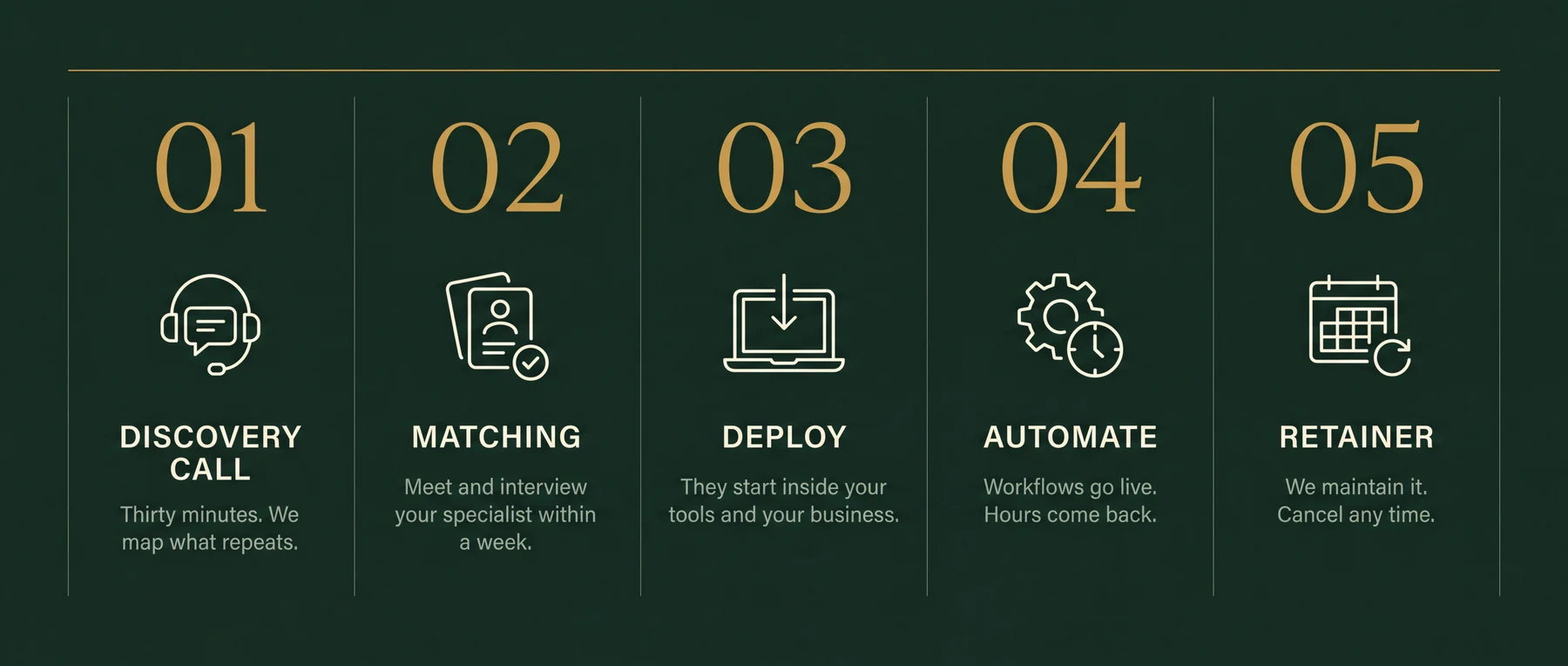
Thirty minutes. Bring your messiest week. You leave with the three workflows worth automating first, sequenced and yours to keep. If we're a fit, your specialist starts within a week.
Document request sequences with graduated reminders in Karbon or TaxDome, engagement letter dispatch and follow-up through DocuSign, recurring invoice generation and payment chasing in QuickBooks or Xero, filing deadline reminders to clients and staff, new client onboarding workflows, and Dext receipt collection nudges. The intro call identifies which workflow is costing the most time.
Yes. Karbon is the most common practice management platform specialists work with. Automations read open engagements, trigger client task sequences, update work item statuses, and push alerts to the team when client tasks are overdue. Your existing workflows stay where they are.
Yes. Both platforms have API access that lets the specialist set up recurring invoice runs, payment reminder sequences, and real-time alerts when invoices go overdue. The specialist connects them to your email and your practice management tool so nothing requires a manual billing run.
Yes. When an engagement opens in Karbon or TaxDome, a workflow checks which source documents are missing and sends a request to the client. A second nudge goes out at day three, and the team gets an alert at day seven if nothing has arrived. No one on the team needs to remember to send these.
Yes. When a new client is added, DocuSign sends the engagement letter automatically. If it is unsigned after 48 hours, a reminder goes out. The signed copy lands in the client file and the onboarding sequence starts. Average time from client added to letter signed drops from several days to under two.
Yes. The specialist sets up a deadline calendar that feeds reminders to both clients and staff ahead of quarterly estimated tax payments, annual filing dates, extension deadlines, and payroll deposit dates. Reminders go out at 30, 14, and 7 days with no manual calendar management.
No. The specialist handles the administrative and communication layer: document chasing, onboarding, billing runs, and deadline reminders. Tax preparation, bank reconciliations, and bookkeeping decisions stay with your CPAs and bookkeepers.
The first workflow is typically running in week one. The intro call identifies the highest-cost problem, usually document chasing or the recurring billing run. That one ships first while the next is being scoped.
The specialist works within your existing practice management tools and does not store client financial data in unsanctioned third-party systems. All access is covered by an NDA. The workflows move and log data between your systems; they do not expose it externally.
Thirty minutes on your messiest week. The three workflows worth automating first are yours to keep either way.