Tomas V.
Logistics and Freight Automation Specialist
Eight years in operations and logistics. Automates status updates, compliance paperwork and the chase for documents nobody wants to send.
- Claude
- Make
- Airtable
- Google Sheets
 Delegated AI
For freight brokers and 3PLs. Works inside McLeod, project44 and your existing ops tools.
Tomas V.
Logistics and Freight Automation Specialist
Eight years in operations and logistics. Automates status updates, compliance paperwork and the chase for documents nobody wants to send.

Maria GomezContent Writer, Delegated AIWrites Delegated AI's guides on automation and delegation.
A logistics and freight automation specialist builds the workflows that send load status updates without a check call, collect carrier packets from new carriers automatically, and chase PODs so your billing team can invoice on time. They work inside McLeod PowerBroker, project44, DAT, Airtable and Google Sheets, connecting the tools a freight brokerage already runs daily.
Last updated
Your dispatchers are on the phone six times per load just to confirm a pickup and get an ETA. Your carrier packet folder is full of expiring insurance certificates nobody flagged. And every week, three or four loads sit in the billing queue because the POD still hasn't come back from the driver.
A POD that takes a week to collect is a week your cash flow sits idle, and the carrier has already been paid.
Shippers get a proactive update at pickup, in transit and delivery without a dispatcher making a single call.
New carriers receive a self-service link, get reminder nudges, and are flagged in the TMS once every document is cleared.
The moment a load delivers, a sequence starts: the driver gets a text, the coordinator gets an alert, and the invoice goes out as soon as the document lands.
One specialist, one flat price, and every workflow they build belongs to you.
A dedicated specialist covering your market hours, including the evening delivery window when drivers are checking in and documents need to move.
No setup fee. No contract. Stop whenever you want.
Never scoped, never billed per project. The backlog just keeps moving.
Everything is built in your own tools. Cancel and it all keeps running.
A short Friday note on what was automated this week and the hours it saves you.
Academy-trained, background-checked, least-access credentials.
| Delegated AI specialist | Freelance consultant | Automation agency | Doing it in-house | |
|---|---|---|---|---|
| What you pay | One flat monthly rate for 20 hours a week | $75 to $150 an hour | A project fee, then a retainer | A coordinator salary plus benefits |
| Knows freight ops | Placed from logistics and dispatch backgrounds | Depends entirely who you get | Sometimes, on the senior accounts | You do |
| First workflow live | Week one | After scoping and a signed statement of work | After discovery and onboarding | Between loads, eventually |
| Works in your TMS | McLeod, Tai TMS, Turvo, 3PL Systems or whatever you run | If they have used it before | Often only their supported stack | Yes |
| Check call volume | Automated via project44 and carrier portals from day one | Billed by the hour | Quoted as a new project | Still manual |
| If you stop | Every workflow keeps running in your accounts | You inherit whatever is documented | Access can end with the contract | Nothing changes |
The consultant and agency columns describe how those engagements are usually structured, not any one firm. Your own quote is confirmed on the intro call.
Your specialist comes AI-trained and fully fluent in:
 Claude
 Airtable
 Google Sheets
 Twilio
 Zapier
 n8n
n8n Slack
Slack Gmail
Gmail Google Calendar
 Notion
Monday 8:12 AM
Thursday 3:44 PM
Wednesday 10:17 AM
Check calls were eating half our dispatchers' day. By the end of the first week the status updates were going out automatically and the team was back on the phone for things that actually needed a human.
 Marcus T.Operations Manager, freight brokerageVerified client
We had loads sitting in the billing queue for two weeks because the POD was stuck somewhere. That cleared up fast. The chase sequence starts the minute a load shows delivered, and now invoices go out the same day.
 Sandra L.Owner, small 3PLVerified client
Month-to-month, cancel whenever you want. If your specialist is not the right fit, we replace them free. And every workflow lives in your own accounts, so it stays yours either way.
5
Every specialist is matched by hand to your stack, your tools and your timezone, which caps how many businesses we can start properly. When this month is full, the next start date is the following month.
One flat fee.
Your dedicated AI Automation Specialist for Logistics and Freight, 20 hours a week.
Month-to-month. No setup fee. Cancel anytime and keep every workflow.
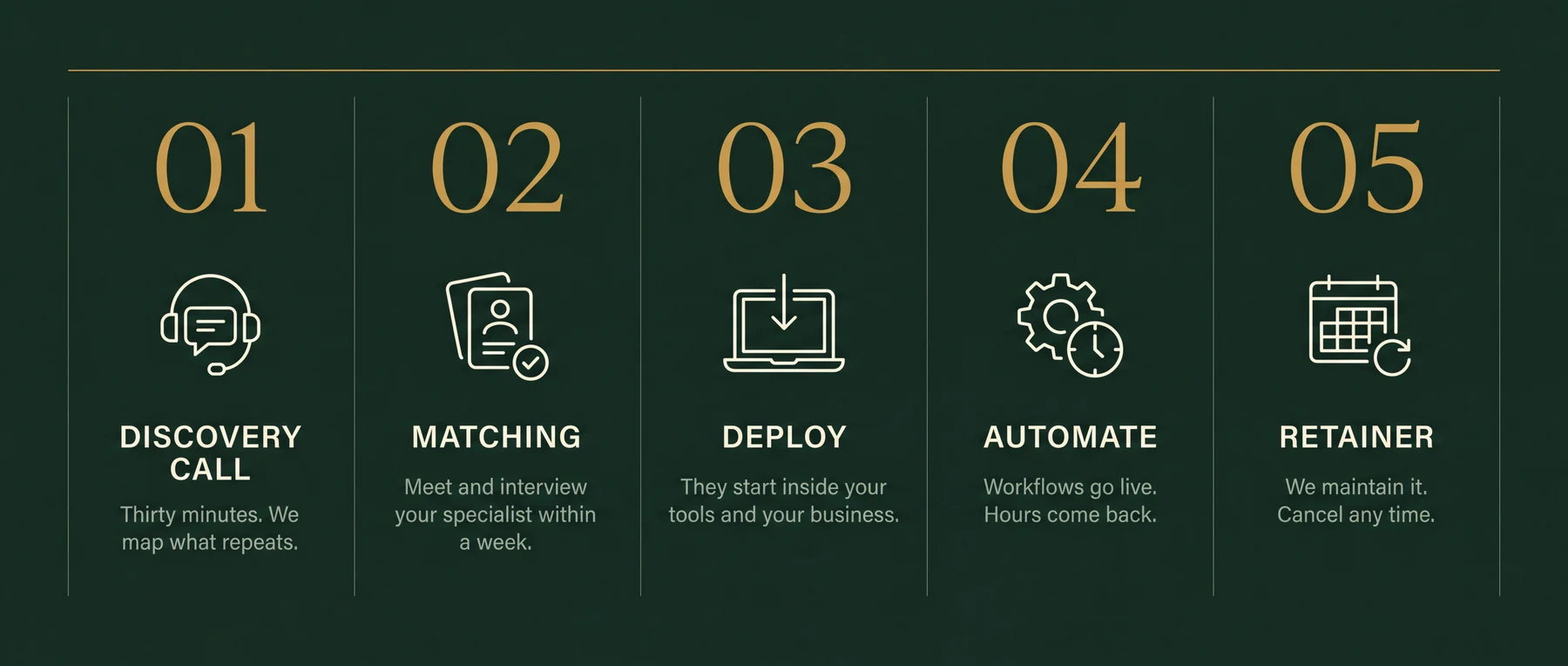
Thirty minutes. Bring your messiest week. You leave with the three workflows worth automating first, sequenced and yours to keep. If we're a fit, your specialist starts within a week.
Load status updates and shipper notifications via project44 or Macropoint, carrier packet collection and compliance document reminders, POD chasing and invoice dispatch, rate confirmation delivery and signature capture, new-carrier approval workflows, and daily load board and AR aging reports. The intro call maps which of those is costing your team the most time each week.
Yes. Your specialist builds automations that connect to McLeod via its API and integration points, pulling load and carrier data and pushing updates back in. The same approach works with Tai TMS, Turvo, 3PL Systems and most cloud-based TMS platforms.
For most status updates, yes. When project44, Macropoint or the carrier's own portal can provide location and ETA data, the automation pushes that to your shipper without a dispatcher dialing out. Exception calls, detention disputes and delivery problems still need a human: the automation clears the routine work so your team focuses on those.
The moment a new carrier is added to your TMS, an automated message goes out with a self-service link to upload their packet documents: insurance certificate, operating authority, W-9, and broker-carrier agreement. Reminder messages fire if documents are missing or near expiry. Your specialist sets the logic; carriers complete it on their own time without back-and-forth emails.
Yes. A trigger fires the moment a load status changes to delivered. The driver and carrier receive a text or email requesting the POD. Once the document lands, it is attached to the load record and your billing team gets an alert or the invoice goes out automatically, depending on how your workflow is set up.
Quote automation can pull lane history from your TMS, apply your margin rules, and return a rate to a shipper email or web form in minutes. The specialist builds the logic and connects it to your pricing data. This is usually the second or third build, after status updates and POD chasing are running.
No. You describe the outcome and the current process. Your specialist maps the tools, builds the automations, tests them on live loads, and hands you a workflow that runs without you touching it.
Every specialist signs an NDA and works on least-access credentials in your own systems. Data stays in your accounts. Security practices are part of their Delegated AI Academy training.
That is exactly what the 20 hours a week cover. Once the first build is live, the hours move to the next workflow, or to tuning the one that is already running. There is no change-order process: adjustments are part of the engagement.
Thirty minutes on your messiest week. The three workflows worth automating first are yours to keep either way.